The Flutter App Development Journey from Concept to Launch
Mobile applications have become so essential to our lives that it’s almost impossible to function without them. But have you ever wondered how a mobile app idea is transformed into a full-fledged software product? This post will walk you through the app development process, focusing on Flutter, one of the most popular technologies in mobile app development.
Why is Flutter a smart choice?
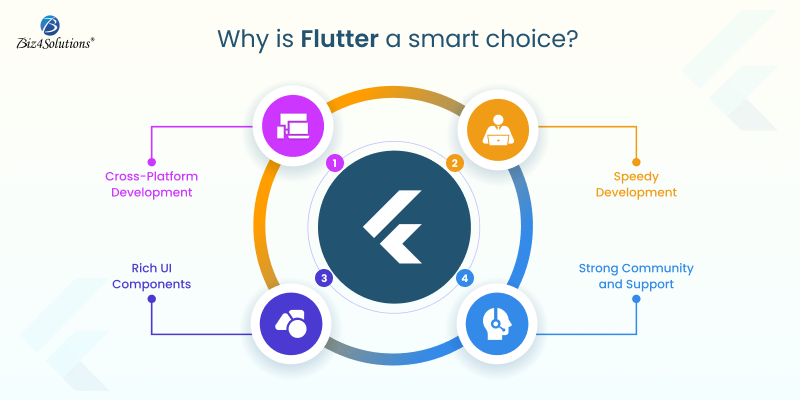
With this Google-developed powerful UI toolkit, you to create stunning, natively compiled apps for mobile, web, and desktop—all from a single codebase. A report published by the popular research portal Statista in June 2024 states: ‘’ Flutter is the most sought-after cross-platform framework globally; with 46% of developers using this technology in the time period of 2019 to 2023”.
- Cross-Platform Development: With Flutter, you can develop apps for both iOS and Android simultaneously, saving time and resources.
- Speedy Development: Thanks to Flutter’s hot-reload feature, developers can view the changes in real time, leading to a faster development process.
- Rich UI Components: Flutter comes with a vast library of customizable widgets; developers can utilize these to create visually appealing and highly responsive apps.
- Strong Community and Support: Being backed by Google, Flutter boasts of a huge community, extensive documentation, and continuous updates.
Flutter App Lifecycle Phases
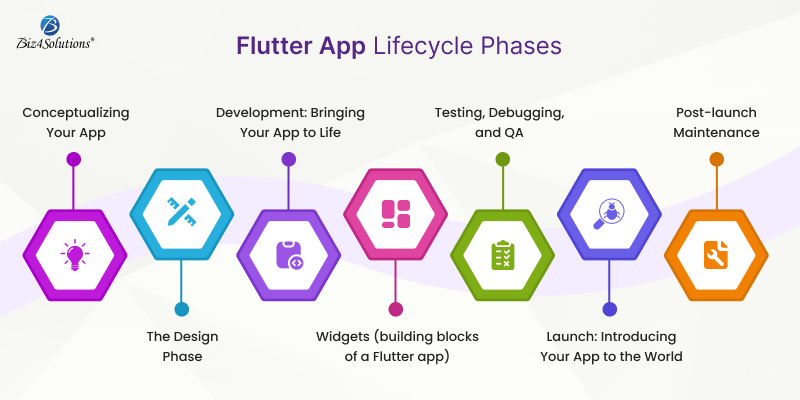
Take a peek through the fundamental aspects of Flutter app development
Conceptualizing Your App
Create comprehensive wireframes or sketches to visualize the structure and user flow.
The Design Phase
Make the app look catchy and create a seamless and intuitive UX. Focus on the layout, color schemes, typography, and overall aesthetics.
Development: Bringing Your App to Life
Now that you have a solid concept and design in place, your app’s functionality is built and transformed from an idea into a working product.
Widgets (building blocks of a Flutter app)
Developers use widgets to create every component of the application right from simple buttons to complex layouts. The Dart programming language is used to write code for creating widgets and implementing features.
Built-in libraries offered by the Flutter ecosystem
- bottom_navy_bar for sleek navigation bars
- intro_slider for onboarding experiences
- local_auth for integrating biometric authentication
- fl_chart for creating dynamic charts and graphs
- cached_network_image library for handling image caching and loading
Pre-built widgets offered by the Flutter ecosystem
- Text for displaying text
- Container for creating layout structures
- Stack for layering widgets on top of each other.
Testing During the development phase
It’s crucial to test the app during development to identify and resolve any issues early on. Flutter’s hot-reload feature is a game-changer in this regard, allowing developers to make quick adjustments and view the results immediately, without the need to restart the entire app.
Testing, Debugging, and QA
Developers perform unit tests, integration tests, and user acceptance testing (UAT) to identify and fix bugs, optimize performance, and ensure the app functions as expected. Flutter’s testing framework allows for efficient testing of individual widgets, app functionalities, and the entire application.
Debugging goes on throughout the development and testing phases. Flutter provides various debugging tools that help developers track down issues, optimize code, and ensure that the app runs smoothly across different devices and platforms.
Launch: Introducing Your App to the World
Deployment of the app to Google Play Store or/and Apple App Store and ASO (App Store Optimization) to promote the app to your target audience.
Post-launch Maintenance
The journey doesn’t end here. Post-launch, it’s crucial to monitor the app’s performance, gather user feedback, and release updates to improve functionality and user experience. Flutter’s flexibility makes it easier to roll out updates and new features, ensuring that your app stays relevant and competitive in the market.
Here’s an example of how to develop, test, and deploy a Flutter app
Step # 1 Configuring the Development Environment
Download the Flutter SDK Flutter’s official Flutter website and then install it.
Use an IDE (Integrated Development Environment) like Android Studio, Visual Studio Code, or IntelliJ IDEA. These IDEs have Flutter and Dart plugins available.
Set up an Android emulator or iOS simulator, or use a physical device to facilitate testing.
Step # 2 Budling a New Flutter Project
Open your IDE and use the IDE’s interface or the command line to create a new Flutter project.
flutter create project_nameNow, navigate to your project directory: cd project_name
Open the project in your IDE.
Step # 3 Understanding the Project Structure
lib/main.dart is the application’s entry point.
The file pubspec.yaml manages the assets, dependencies, and other configurations of the app.
Android and iOS folders: Contain platform-specific code.
Step # 4 Developing the Application
Use Flutter’s widget tree structure to design the UI. Flutter’s MaterialApp, Scaffold, Container, Text, Image, and other widgets come in handy when crafting the app’s UI.
Manage the app’s state using tools like setState, InheritedWidget, Provider, Riverpod, or Bloc.
Modify pubspec.yaml to include the necessary libraries and packages; then run the command: flutter pub get
Step # 5 Testing
Using the IDE’s debugging tools, set breakpoints, inspect variables, and debug the app; and then, run your app on an emulator or a physical device using this command: flutter run. Write unit tests, integration tests, and widget tests to ensure QA.
Unit Testing:
Create a test file in the test/ directory, e.g., test/widget_test.dart.
Write a simple test:
import ‘package:flutter_test/flutter_test.dart’;
import ‘package:my_flutter_app/main.dart’;
void main() {
testWidgets(‘Check Hello, World! text’, (WidgetTester tester) async {
await tester.pumpWidget(MyApp());
expect(find.text(‘Hello, World!’), findsOneWidget);
});
}
Now, use the flutter test command to run this test.
Integration Testing:
Create an integration test under the integration_test/ directory, e.g.,
integration_test/app_test.dart.
Example integration test:
import ‘package:flutter_test/flutter_test.dart’;
import ‘package:integration_test/integration_test.dart’;
import ‘package:my_flutter_app/main.dart’;
void main() {
IntegrationTestWidgetsFlutterBinding.ensureInitialized();
testWidgets(‘Integration test’, (WidgetTester tester) async {
await tester.pumpWidget(MyApp());
expect(find.text(‘Hello, World!’), findsOneWidget);
});
}
Run the integration test using the command: flutter drive –target=integration_test/app_test.dartStep # 6 Building the App for Release
For Android: Set up signing for your app by configuring the key.properties file.
Use the below command to create the APK or app bundle.
flutter build apk
flutter build appbundle
For iOS: Configure app signing in Xcode and build the app for iOS with this command: flutter build ios
Step # 7 Deployment
Android Deployment:
Update the android/app/build.gradle file with your app’s version and other configurations. Build the APK: flutter build apk –release Locate the APK at build/app/outputs/flutter-apk/app-release.apk and distribute it via the Play Store.
iOS Deployment:
Open the ios/ directory in Xcode. Update the app’s version, build number, and other settings in the project settings. Archive the app and distribute it via the App Store.
Step # 8 Post-deployment Maintenance
Keep an eye on user feedback, monitor performance, and roll out the necessary updates whenever needed using the same process for building and deploying.
Step # 9: Deployment (CI/CD) and Ongoing Integration
Set up CI/CD pipelines for automated testing and deployment using tools like GitHub Actions, Bitrise, or Codemagic. Integrate services like Firebase Analytics and Crashlytics for monitoring the app in production.
Example GitHub Actions workflow:
name: Flutter CI
on: [push]
jobs:
build:
runs-on: ubuntu-latest
steps:
– uses: actions/checkout@v2
– uses: subosito/flutter-action@v1
with:
flutter-version: ‘2.5.0’
– run: flutter pub get
– run: flutter test
– run: flutter build apk –release
End Note
A Flutter app’s journey from concept to launch is a complex yet rewarding process requiring a blend of creativity, technical expertise, and strategic planning. Engaging software development professionals to guide and execute the workflow ensures a smoother and more successful outcome.
Whether you’re a startup looking to break into the app market or an established business aiming to expand your digital presence, Flutter provides the tools you need to turn your app idea into reality. So, what’s your next big app idea?