8 Costly Mistakes Businesses Make When Choosing No-Code, Low-Code or Custom Development
Over the course of this series, we have moved from understanding the technology to understanding the business decisions behind it.
In Part 1 – No-Code vs Low-Code vs Custom Development – The 2026 Decision Guide, we established what each approach means and where each one fits.
In Part 2 – How AI Is Rewriting the No-Code vs Low-Code vs Custom Development Debate, we explored how AI-assisted engineering is changing development speed, productivity, and the economics of custom software.
In Part 3 – No-Code vs Low-Code vs Custom Development in 2026: What Should Businesses Choose?, we compared the three approaches across the factors that matter most—cost, scalability, performance, security, AI readiness, flexibility, and long-term control.
And in Part 4 – Real-World Scenarios: Which Approach Makes Sense for Different Businesses?, we put those differences into context by looking at startups, enterprise workflows, AI-first products, regulated industries, and businesses at different stages of growth.
But there is still one critical piece missing.
Even when businesses understand their options, they can still make the wrong technology decision, for the wrong reasons.
A platform may be selected because it is cheaper today, faster to launch, currently trending, or familiar to the team. Yet those factors alone say very little about whether the technology will continue to support the business as requirements, users, integrations, and competitive pressures evolve.
That is why the final part of this series focuses not on which technology to choose, but on how to avoid choosing it badly.
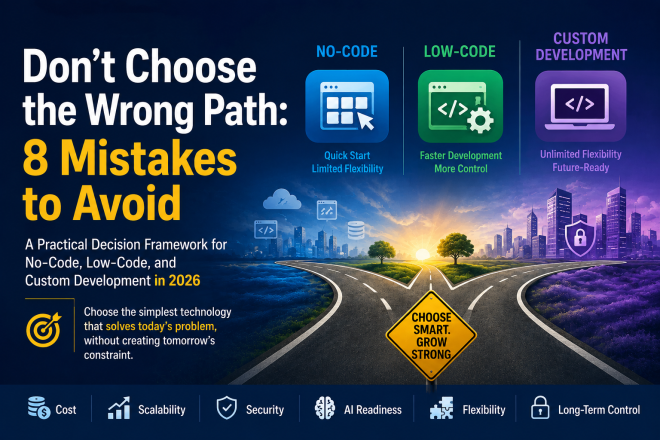
We will examine eight common mistakes; from over-engineering too early and staying on No-Code too long, to ignoring vendor lock-in and following technology trends without considering business strategy. We will then bring the entire series together with a practical decision framework built around a simple principle:
Choose the simplest technology that solves today’s problem, without creating tomorrow’s constraint.
Mistakes Organizations make regardless of Industry or Company Size
Mistake 1: Optimizing for Today’s Budget Instead of Tomorrow’s Business
Every business has budget constraints. Naturally, the least expensive option often looks the most attractive. But software isn’t a one-time purchase. It’s an asset that evolves with your business.
Consider two founders launching similar SaaS products. Founder A chooses the least expensive no-code platform because it saves $25,000 upfront. Founder B invests more in a scalable architecture.
Eighteen months later:
· Founder A spends months rebuilding the application.
· Founder B continues releasing new features.
The original savings disappear quickly when migration costs, engineering effort, downtime, and customer disruption are considered.
So, instead of asking: “Which option costs the least today?”
Ask: “Which choice makes the most financial sense over a three- to five-year horizon?”
Mistake 2: Assuming Faster Development Means Faster Business Growth
A common misconception is: Faster development = Faster success.
Unfortunately, launching software is only the beginning. Business growth depends on: Customer acquisition, Product quality, Reliability, Continuous improvement, User experience, and Operational efficiency.
Launching two months earlier doesn’t guarantee market success if the product cannot evolve quickly afterward.
Speed matters. Sustainable speed matters even more.
Mistake 3: Building Custom Software Too Early
This mistake is particularly common among first-time founders. They envision the product they’ll have in five years and attempt to build everything from day one.
Features include: Multi-tenancy, Advanced analytics, AI recommendations, Enterprise permissions, Complex billing, and Workflow automation.
The result? Development stretches from four months to twelve. Meanwhile, customer feedback never arrives because the product hasn’t launched.
Remember
Customers validate products, not architecture diagrams. If you’re still testing your assumptions, simplicity is often a competitive advantage.
Mistake 4: Staying on No-Code Long After You’ve Outgrown It
The opposite mistake is just as common. A company launches successfully on a no-code platform. Revenue grows. Customers increase. The team begins requesting: Custom integrations, AI capabilities, Advanced reporting, and Complex workflows.
Instead of reassessing the technology strategy, more plugins, workarounds, and external automation tools are added. Eventually, the system resembles a collection of connected services rather than a cohesive product.
At this stage, every new feature becomes slower to deliver. Ironically, the platform that accelerated the first version now slows down innovation.
Mistake 5: Confusing Internal Tools with Customer Products
Not every application deserves the same level of engineering investment. Imagine these two projects:
Project A: An internal equipment booking system for 40 employees.
Project B: A customer-facing AI platform expected to support 100,000 users worldwide.
Technically, both are software projects.
Strategically, they’re completely different. Project A prioritizes efficiency. Project B prioritizes scalability, performance, security, and customer experience. Using the same development strategy for both rarely makes sense.
Mistake 6: Ignoring Vendor Lock-In
Vendor lock-in doesn’t receive enough attention during the planning phase because everything works well initially. The challenges emerge later. You may discover that:
- Exporting your application is difficult.
- Business logic cannot be migrated easily.
- Platform pricing has changed.
- API limitations restrict new features.
- Critical plugins are no longer maintained.
None of these issues are urgent when the product is small. They become significant when the business depends on the platform. That doesn’t mean vendor lock-in should prevent you from using no-code or low-code. It simply means it should be part of the decision, not an afterthought.
Mistake 7: Choosing Technology Based on Trends
Every few years, the industry declares a new “best” way to build software.
First it was monolithic applications. Then microservices. Then serverless. Then no-code. Now it’s AI-generated applications. Technology trends are valuable because they introduce new possibilities. They’re dangerous when they become the primary reason for making architectural decisions.
The right technology stack is defined by what your business needs, not what’s newest. It’s the one that aligns with your business goals, technical requirements, and team’s capabilities.
Mistake 8: Forgetting That Software Is Never Finished
Many businesses approach software as if it’s a construction project.
Build it. Launch it. Move on. Modern software doesn’t work that way. Every successful product evolves through:
· Customer feedback
· Market changes
· New regulations
· Competitive pressure
· AI advancements
· Changing business models
The technology you choose today should support continuous evolution, not just initial delivery. That’s why maintainability deserves as much attention as development speed.
A Practical Decision Framework
Instead of asking:
· Should we use Bubble?
· Should we choose Flutter?
· Should we build everything in React?
· Should we adopt Power Apps?
Start by answering these business questions:
1. Are we validating an idea or scaling a proven business?
Validation favors speed. Growth favors scalability.
2. Is this an internal tool or a customer-facing product?
Internal tools often benefit from no-code or low-code. Customer products usually demand greater flexibility.
3. Will AI become a core capability?
If AI is central to your competitive advantage, ensure your technology choice won’t limit future innovation.
4. What happens if this product grows 10x?
Can your platform support: More users? More data? More integrations? More business rules? More developers? If not, you may be postponing an inevitable migration.
5. Is this software a cost center or a competitive advantage?
This may be the most important question of all. If software simply supports internal operations, optimize for efficiency. If software is your business, optimize for long-term flexibility and differentiation.
Here’s a principle that has guided many successful software initiatives:
Build only as much architecture as your current business justifies, but never so little that your success becomes your biggest technical problem.
That balance isn’t always easy to find, but it’s where the best technology decisions are made.
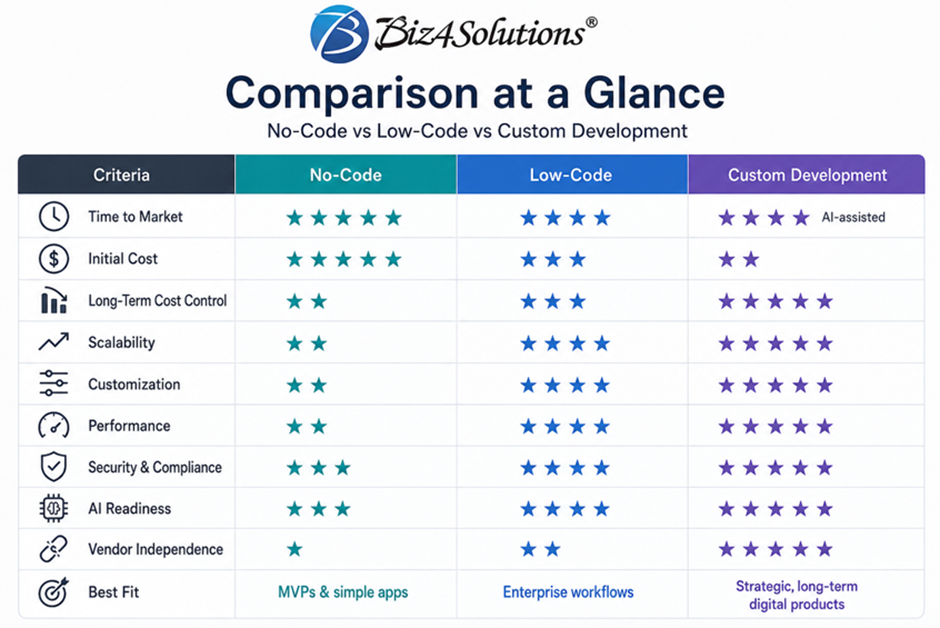
The Decision Matrix: Which Approach Should You Choose?
After reading this far, you may still be wondering: “So, what should we actually choose?”
The honest answer is:
It depends on where your business is today, not where someone else’s business is.
Rather than recommending one technology over another, let’s use a practical decision framework that you can apply to almost any software project.
Notice something interesting? There isn’t a single winner. Each approach is solving a different business problem.
Think of Technology as an Investment Portfolio
Most organizations don’t invest all their money in a single asset. They diversify. The same principle applies to software.
A mature organization might use:
· No-Code for departmental applications and prototypes.
· Low-Code for operational workflows.
· Custom Development for products that directly generate revenue.
This isn’t indecision. It’s strategic allocation. Every technology is being used where it creates the most value.
Looking Beyond Technology
One mistake we often see is treating software as purely a technical decision. In reality, software is a business investment.
When evaluating development approaches, consider questions such as:
- Will this help us serve customers better?
- Will it reduce operational costs?
- Can it support our growth plans?
- Will it make future innovation easier?
- Can new team members maintain it?
- Does it provide a competitive advantage?
These questions are often more important than comparing programming languages or platforms.
What Does the Future Look Like?
The software industry is entering one of its biggest transformations since cloud computing. Between 2026 and 2030, we expect several major shifts.
1. AI Will Become a Standard Development Tool
Developers will spend less time writing repetitive code and more time designing systems, validating AI outputs, and solving business problems. The competitive advantage won’t come from writing code faster—it will come from building better products.
2. Business Users Will Build More Software
No-code and low-code platforms will continue empowering operations teams, analysts, and business managers to create applications independently. This will reduce pressure on engineering teams for smaller operational projects.
3. Engineering Teams Will Focus on Strategic Systems
As routine development becomes increasingly automated, engineering teams will spend more time on: Product architecture, AI systems, Security, Platform engineering, Scalability, and Integration ecosystems. Their role will become more strategic than ever before.
4. AI Will Blur the Line Between No-Code and Custom Development
Already, many no-code platforms generate code behind the scenes. At the same time, AI coding assistants enable developers to build production-ready applications much faster. Over the next few years, the distinction between visual development and traditional coding will become less pronounced. Businesses won’t choose platforms because they’re “no-code” or “high-code.” They’ll choose them because they solve the problem efficiently.
5. Hybrid Technology Strategies Will Become the Norm
Instead of standardizing on a single platform, organizations will assemble ecosystems. For example:
- Customer-facing products built with custom software.
- Internal workflows automated through low-code platforms.
- Marketing landing pages managed using no-code tools.
- AI agents orchestrating processes across all of them.
The future isn’t about choosing one approach. It’s about combining them intelligently.
Final Thoughts
The debate around No-Code vs. Low-Code vs. Custom Development often assumes there must be a winner. There isn’t. Each approach has earned its place because each solves a different set of business challenges.
If you’re validating an idea, prioritize speed. If you’re streamlining internal operations, prioritize efficiency. If you’re building a product that will define your business for years to come, prioritize flexibility and scalability.
The most important takeaway is this: Don’t choose technology because it’s popular. Choose it because it’s appropriate for your business today and adaptable for your business tomorrow.
In 2026, successful digital products aren’t built by companies that follow technology trends. They’re built by organizations that make thoughtful technology decisions aligned with their business strategy.
And that’s a far more sustainable competitive advantage than choosing the latest framework.