Real-World Scenarios of No-Code, Low-Code, and Custom Development: Which Approach Makes Sense for Different Businesses?

Real-World Scenarios of No-Code, Low-Code, and Custom Development: Which Approach Makes Sense for Different Businesses?

In the previous three blogs of this series, “No-Code vs Low-Code vs Custom Development – The 2026 Decision Guide,” “How AI Is Rewriting the No-Code vs Low-Code vs Custom Development Debate,” and “No-Code vs Low-Code vs Custom Development in 2026: What Should Businesses Choose?”, we explored the foundations of No-Code, Low-Code, and Custom Development, how AI is reshaping software development, and how the three approaches compare across speed, cost, scalability, security, performance, and AI readiness.

Now comes the more practical question:

Which approach makes sense for a specific business at a specific stage of growth?

There is no universal winner. The right choice depends on what you are building, how mature the business is, and how complex the product needs to become. I have penned down some real-world scenarios that make the differences clearer!
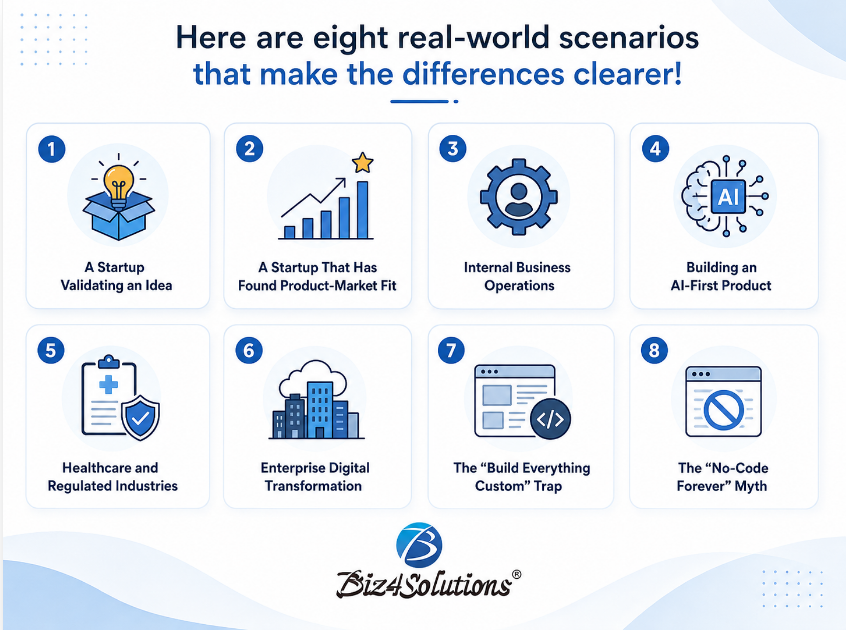
Scenario 1: A Startup Validating an Idea

Imagine a startup connecting pet owners with certified trainers. There are no customers yet, no proven demand, and no certainty that users will pay. The goal is not to build perfect software. It is to answer: “Does anybody actually want this product?”

Recommended Approach: No-Code

Platforms such as Bubble or FlutterFlow can help founders launch quickly, collect feedback, and validate assumptions without a large engineering investment.

At this stage:

  • Speed matters more than perfection.
  • Learning matters more than optimization.
  • Customer feedback matters more than architecture.

Think of the MVP as an experiment, not the final product.

Scenario 2: A Startup That Has Found Product-Market Fit

Now imagine the same startup two years later.

It has: * 25,000 active users * Paying customers * More API integrations * AI-powered recommendations * Multiple subscription plans

The platform that helped the business launch may now be limiting performance, integrations, and feature development.

Recommended Approach: Transition toward Custom Development

This does not necessarily mean rebuilding everything at once. A phased migration can move strategic functionality into a custom architecture while keeping parts of the original system running.

The key is recognizing when business growth has started to outpace platform capability.

Scenario 3: Internal Business Operations

A manufacturing company wants to digitize: * Leave approvals * Asset requests * Purchase approvals * Maintenance schedules

The system will be used by around 150 employees and does not require a sophisticated customer-facing experience.

Recommended Approach: Low-Code

Platforms such as Microsoft Power Apps, Mendix, or OutSystems can be well suited to forms, approvals, dashboards, reporting, and workflow automation.

Building everything from scratch may add engineering effort without creating equivalent business value.

Scenario 4: Building an AI-First Product

Suppose an application needs to: * Process video uploads * Use LLMs for analysis * Store vector embeddings * Use RAG * Coordinate AI agents * Generate personalized reports * Integrate with external CRMs

This is no longer simply an application. It is an AI platform.

Recommended Approach: Custom Development

Advanced AI products often require greater control over: Prompt and model orchestration Model switching Security Observability Performance Business-specific logic * Complex integrations

No-Code and Low-Code can support AI integrations, but as AI architecture becomes more specialized, custom development usually offers greater flexibility.

Scenario 5: Healthcare and Regulated Industries

Consider a healthcare provider building a patient engagement platform with: * Patient records Appointments * Teleconsultations * AI-assisted summaries * Audit trails * Role-based access * Compliance requirements

Recommended Approach: Custom Development

Regulated systems often require greater control over data storage, authentication, encryption, logging, infrastructure, and compliance processes. Custom Development can support HIPAA-compliant solutions when the application, infrastructure, data handling, access controls, audit mechanisms, and operational processes are designed and implemented to meet HIPAA requirements.

Custom Development does not automatically guarantee compliance, but it provides the architectural flexibility and control needed to build systems around complex regulatory requirements such as HIPAA.

Scenario 6: Enterprise Digital Transformation

A global enterprise wants to modernize Finance, Procurement, HR, Supply Chain, and Customer Support. Some applications are simple. Others require deep ERP, CRM, and AI integrations.

Recommended Approach: Hybrid Strategy

A practical combination may be:
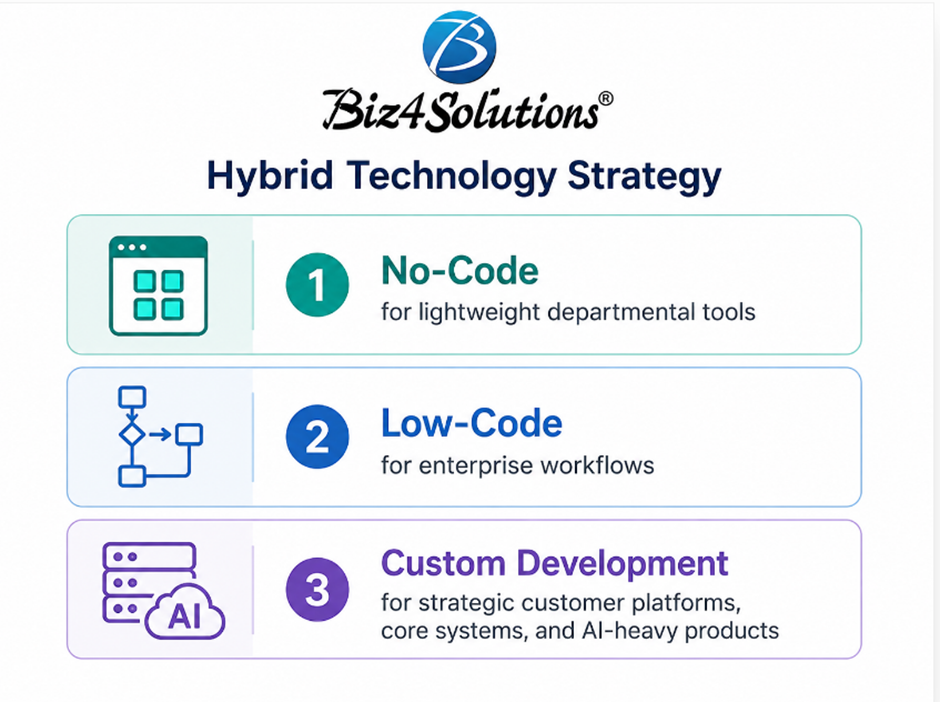
The objective is not to standardize everything on one technology. It is to use the right level of engineering for each problem.

Scenario 7: The “Build Everything Custom” Trap

Imagine a 30-person business needing employee onboarding, expense approvals, visitor management, and IT support requests.

Could these systems be custom-built? Yes.

Should they be? Probably not.

Recommended Approach: No-Code or Low-Code: Engineering effort should be focused where software creates differentiation or competitive advantage.

Not every problem deserves a custom solution.

Scenario 8: The “No-Code Forever” Myth

The opposite mistake is staying with the original platform long after the business has outgrown it.

As the product grows: * Integrations multiply * Workarounds increase * Plugins become critical * Performance issues appear * New features become harder to deliver

Eventually, a platform chosen for speed can begin slowing innovation.

Recommended Approach: Reassess and Evolve: Technology decisions should be revisited as the product and business mature.

The Best Technology Strategy Is Often Evolutionary

A platform decision does not have to be permanent. A common journey may look like this:

The technology evolves because the business evolves.

Key Takeaway

The decision should not begin with identifying the “best” technology.

It is: “Which development strategy can address the business’s current requirements without restricting future opportunities?”

The strongest technology choices align engineering investment with business maturity.

Coming Next

In the next article, we will examine Common Mistakes Businesses Make When Choosing a Development Approach, including over-engineering too early, staying on a platform too long, ignoring vendor lock-in, and picking the tech stack based on current trends rather than business requirements. Because choosing the right technology matters.

The real value lies in choosing it for the reasons that genuinely support the business.

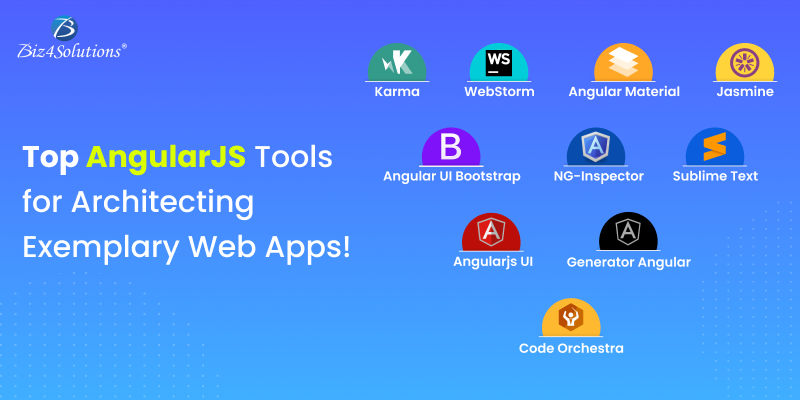
Top AngularJS Tools for Architecting Exemplary Web Apps!

Top AngularJS Tools for Architecting Exemplary Web Apps!
Angularjs Development Company
AngularJS is a structural framework extensively used for designing dynamic single-page web applications. Based on JavaScript, this framework also provides extended support for HTML5. AngularJS is a perfect pick when the performance and
the user experience of the apps are the top priority. Owing to the myriad benefits it offers, some Tech veterans and expert Angular.js app developers have even termed this framework as a web app synthesizing powerhouse. As a result,
this disruptive framework is highly in demand for web app development.
But, for developing a quality application, AngularJS tools play an important role. Without the right set of AngularJS development tools, this framework can’t really deliver the best results. These tools ease the development process by
helping developers to build attractive and professional templates. So, before starting the development, it is advisable to have knowledge of these tools.
This blog outlines a short curated list of some of the most well-known AngularJS tools available in the market for building web apps. Let’s dive in deeper.

Popular AngularJS Tools for Architecting Creative Web Apps

Angularjs Development Company

Karma

This tool primarily focuses on the testing part. It offers an ideal testing environment for Angular app developers as it comes with rich features like mobile handset
support, real browser implementation, etc. Thus, developers can test the apps on real devices and real browsers. This testing flexibility ensures that the final website will be quite flawless.

WebStorm

WebStorm is a tool that comes with one of the best and smartest code editors that extends substantial support to Node.js, JavaScript, HTML, CSS, etc. along with their progressive successors. WebStorm is also known to be the best
AngularJS IDE. It works well with most new-age technologies, making it a flexible tool. Another important feature of this tool is that it comes with a live editor which enables the developers to view the changes in the code instantly.

Angular Material

More than a tool, it is a UI component library consisting of approximately 30 UI components and services. The UI components are easily accessible, reusable, and well-tested for web app development. It offers features like browser
portability, graceful degradation, and device independence which are fundamental design parameters and enables the development of outstanding websites. Right from creating simple buttons on the website or features that hover around,
Angular Material supports everything.

Jasmine

It is a behavior-driven testing tool and doesn’t depend on DOM, browsers, or other JavaScript frameworks. This AngularJS development tool suits any project where JavaScript runs and also for any project that is built on Node.js.

Angular UI Bootstrap

This tool is created on top of Bootstrap- a well-known front-end framework. It is best known for the flexibility of customization it provides during web app development. It allows developers to utilize a host of components with
dependencies like Bootstrap CSS, Angular Js, Angular- Touch, Angular- Animate, etc.

NG-Inspector

It is the browser extension for Safari, Firefox, and Chrome. It acts as an inspector pane that helps developers understand the AngularJS apps and create and debug them. Also, with the use of Controllers and Directives, this tool easily
identifies and displays every scope.

Sublime Text

In case the developers are looking for an easy alternative rather than hectic coding, Sublime Text is the apt solution. It is known to be the best text code editor which is preferred by a large number of Angular app developers worldwide
as it makes coding less tedious and more fun.

Angularjs UI

This AngularJS development tool is nothing but a collection of UI components. It consists of utility directives that aid in the speedy development of web apps. It utilizes raw directives like ui-map, ui-router, ui-calendar, etc. instead
of widgets. It is quite easy to use, lightweight, flexible, and back-end agnostic.

Generator Angular

This is another tool that enables faster development that too with a few terminal commands. It allows the developers to set up any project quickly with sensible defaults. The devices can automatically generate a development server,
frameworks, units, views, directives, and many more.

Code Orchestra

It is a front-end development tool utilized for both- development and testing purposes. It allows the Angular developers to write the code in real-time. As the code is modified and saved, the changes are instantly updated on the working
app with the use of a special protocol. Also, this tool supports any IDE.

Angular Kickstart

As the name suggests, this tool is considered the best fit for SPA development. It has a scalable build system for making the development and testing a cakewalk. This tool helps in maintaining the consistency of the project structure
and helps one to effortlessly create a fully optimized production release.

Few other AngularJS Tools

  • Rectangular: It is a tool that needs minimum client code and simplifies common GET, DELETE, POST, and UPDATES requests. It best suits Web Apps that consume data from a RESTful API.
  • Protractor: This is an open-source framework that allows developers to perform end-to-end testing for Angular and AngularJS development projects. It is built on WebDriver. This tool is also used for
    writing regression tests for web applications.
  • Videogular: As the name indicates, this Angular.js app development tool is nothing but an HTML5-based video player that enables the developers to easily include multimedia elements and videos in the
    apps.
  • Djangular: This is a reusable tool that offers enhanced app integration with AngularJS.
  • Mean: It’s a perfect and simple boilerplate that comes with configured and pre-bundled modules like Passport, Mongoose, etc. Mean is used for the creation of apps in MongoDB, Express, Node.js, etc.
  • Suave UI: This tool utilizes CSS definitions like Form Elements, Grids, Colored Buttons, etc. Its services and directives help in the quick and efficient development of various web-based user
    interfaces.
  • Mocha.js: It is a feature-rich JS test framework that runs on node.js and the browser. It is quite flexible with accuracy in terms of mapping and reporting.
  • AngularFire: This tool comes with features like 3-way data binding and flexible API that ease the development. It enables the easy creation of the backend of an Angular app.
  • Angular Deckgrid: It is a lightweight grid where the directive makes use of a CSS file for any visual representation and doesn’t rely on it.
  • Angular GetText: This tool is considered a super easy translation support tool. Using this tool, one just needs to type the text in English and mark it for translation. The tool takes care of it once
    marked for translation.

Final Verdict:

If you are an Angularjs development company or an Angular app developer thinking of using AngularJS for your web app development project, the aforesaid tools
will be great to start with. These Angular.js mobile app development tools will together aid in several functions like front-end development, testing, code generation, etc. These AngularJS development tools will also enable you to
leverage text editor, IDE editor, modules, Grid tools, extensions, elite libraries, and more. They will facilitate smooth and easy-going development of creating your web app.