Top 8 Tools for Debugging React Native Applications!

Debugging an application is the most essential part of the complete React Native development process before the application is pushed to the production phase. This is true for other technologies as well. Debugging involves thorough checking of the code and helps in the early detection of error conditions. Fixing these errors or bugs during the React Native app development process, instead of fixing them in the production stages can be highly economical for every company offering React Native app development services.
So, how does the debugging take place in React Native? Well, thanks to the availability of a wide range of React Native debugging tools that help the developers debug their code efficiently in a short time.
This post is a brief guide for you, where we will be exploring the most popular debugging tools used for React Native applications globally. So let’s quickly get started.
Most Efficient Debugging Tools for React Native Developers
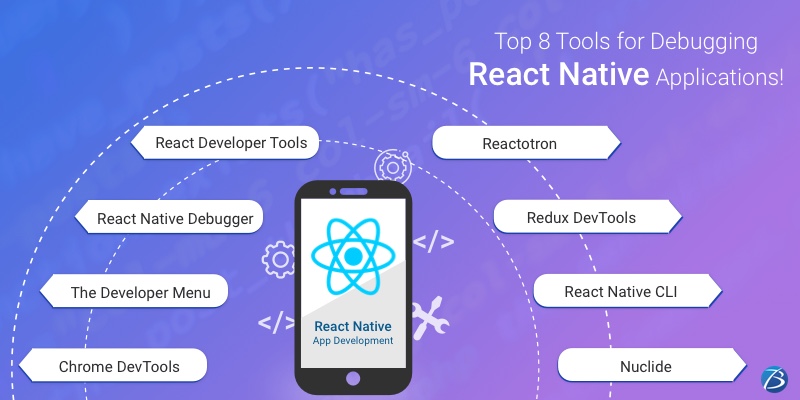
React Chrome Developer Tools
‘Chrome DevTools’ is usually the first name that comes to the mind of a React Native developer for debugging the code of an app. Being powered by JavaScript, this tool enables the debugging of both web appsas well as mobile apps. The React Native framework supports this tool through its remote debugging abilities by default.
So how does this tool work?
When your React Native app is running on an Android Emulator and you have to access the in-app developer menu, press ‘Cmd+M’ on Mac or ‘Ctrl+M’ on Windows. When the app runs on a real device, simply shake the device. Now, a menu will appear and you need to click on “Debug JS Remotely” to open the Google Chrome debugger. Thereafter, press ‘Command+Option+I’ on Mac or ‘Ctrl+Shift+I’ on Windows to open Developer Tools. You can now use console statements and debug the app. You may view your code by clicking on the Developer Tools Sources tab and open-sourcing the files. From here, you can add breakpoints and easily debug the app using the ‘Chrome DevTools’.
The Developer Menu
The developer menu comes with a plethora of options for the developers to carry out various functions, as given below:
- Reloading option for reloading the app
- Enabling Hot Reloading for watching the changes accumulated in a changed file
- Debugging js remotely for opening a channel to a JS Debugger
- Enabling Live Reloading for allowing the app to automatically reload when the save button is clicked
- Toggle Inspector for toggling an inspector interface. It enables the developers to inspect a UI element present on the screen along with its properties. This interface has some other tabs too, which include a tab for performance and for networking that show us the HTTP calls
React Native Debugger
This React Native tool is a stand-alone desktop application that works on Linux, Mac, and Windows and is one of the most recommended debugging tools. It can be integrated with the other two tools- React’s Developer Tools and Redux DevTools, thus giving you the best of both tools. This combination doesn’t require any setup and can be installed quickly with ease. With this combination, react native developers can get some of the best features as below:
- Profiler: Identify performance issues by getting a flamegraph with components
- Elements: for examining the styles of the elements, editing them, and instantly viewing the results in the simulator
- Console: for examining different errors and warning messages
- Network: for checking and recording network requests
- Sources: for debugging JS, setting breakpoints, and walking through the code.
- Memory: for detecting any memory leaks
React Developer Tools
This tool is considered one of the best tools for debugging React Native due to the following reasons.
- This tool allows the debugging of React components.
- Its new version allows debugging styles in React Native and also works simultaneously in the developer menu with the inspector. In this version, the developers can debug and employ the style properties and without even reloading the app can instantly view the modifications implemented in the app.
So how do you get started with this tool?
You need to use the desktop app for debugging React Native with this tool. It can be installed locally as well as globally in the project by using the below command- “yarn add react-devtools” or npm- “npm install react-devtools –save”
Now you can start the application by running the command- “yarn react-devtools” which will launch your application.
Reactotron
This open-source desktop app was designed in 2016 by Infinite Red. This tool enables the inspecting of the apps quite effortlessly. It is available for various operating systems like Linux, Mac, and Windows. It offers amazing features like:
- state tab
- React Native tab
- timeline tab for tracking app events and Redux actions
- connections for running several devices simultaneously and quickly switching debugging
Redux DevTools
Redux DevTools is also a standalone tool and a state container for JS applications. It is meant for both- React Native and React JS. It is used for common state management and allows easy inspection between actions and their reflections on the data store. Redux DevTools allows using redux debug components directly into the applications. This tool comes with several useful features such as Chart, Slider, Inspector showing real-time actions, Dispatcher, State tab, Action tab, Diff tab, Log Monitor, Test tab, Export/import, etc. You can start using this tool by installing the Redux Devtools Extension to the firefox or chrome browser.
React Native CLI
This React native tool is majorly used for developing React Native apps and is also used as a debugging tool at times. React Native CLI helps to access some relevant information about the dependencies and libraries used in the app. This information can be then used for debugging some bugs that take place due to a mismatch of different versions of tools being used for your app development.
Nuclide
Nuclide is an open-source tool and enjoys the support of a strong community. It can be added as a plug-in on top of Atom- a renowned IDE built by Facebook. It offers some outstanding features like auto-complete, jump-to-definition, inline errors, etc. Also, it provides services like Hack development, Remote, and JavaScript development, working sets, built-in debugging, task runner, mercurial support, etc.
So, our blog comes to an end with this.
Final Verdict:
Apart from the tools mentioned above, there are several other React Native debugging tools like Flow, Expo, Ignite, Visual Studio Code, etc. that can be considered by the React Native development services for their projects. It depends on what tool seems right for your project requirement, what your budget and time considerations are, and what your developers are convenient with. You may even go with a combination of some of these tools. And last but not the least, hiring skilled and experienced React Native developers or React native app development company also impacts the debugging process.
We hope this read was insightful!
Do share your knowledge and experiences about other React Native Developer Tools in the comments section.
Here is a detailed list of the top-notch React Native developer tools widely used for serving various purposes like development, debugging, testing, etc. in the React Native development process.
Also, here are some of the UI component libraries used in React Native
for building world-class apps.
for building world-class apps.