Revolutionizing Financial Customer Support: Essential Features for Modern Contact Centers
In the financial services industry, customer satisfaction and trust are paramount. A seamless, secure, and efficient contact center can play a critical role in achieving these goals. Choosing the right software solution for your financial contact center is a significant decision that impacts customer experience, compliance, and operational efficiency. Here are the key features to look for
when selecting contact center software for your financial institution. Let’s explore with the help of a use case example- Number Sentry.
Number Sentry: At a Glance
Number Sentry is a unique and innovative solution designed to support dialer companies, financially-focused call centers, and leading call center consultants. As a
licensed provider, Number Sentry helps improve customer engagement rates and addresses common challenges associated with outbound calling. The web platform identifies the underlying issues that lead to low answer rates, delivers
actionable insights into dialing strategies, and empowers contact centers to optimize key performance metrics across their outbound operations.
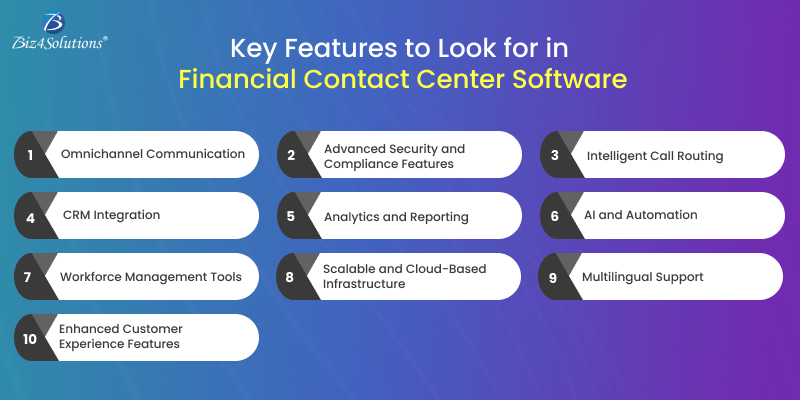
10 Must-Have Features of Financial Contact Center Software
1. Omnichannel Communication
Modern customers expect support through various channels, including phone, email, live chat, social media, and SMS. A robust contact center software should integrate all these communication channels into a single platform, ensuring
a consistent and seamless customer experience.
In our current implementation for a financial services client, we successfully integrated voice, chat, and email support into a unified agent interface, allowing customer service teams to handle interactions without switching tools;
drastically improving response time and satisfaction.
2. Advanced Security and Compliance Features
Security and compliance are non-negotiable in financial services software. Look for software that offers:
- End-to-End Encryption: Protect sensitive customer data.
- PCI DSS Compliance: Ensure secure payment transactions.
- Real-Time Monitoring: Detect and prevent fraud.
- Audit Logs: Maintain an accurate trail of all interactions for regulatory purposes.
Our recent deployment included a fully compliant environment with tokenization for payment data, GDPR readiness, and dynamic access controls—ensuring peace of mind for both the institution and its clients.
3. Intelligent Call Routing
Efficient call routing ensures customers are connected to the right agent based on their needs. Features like skills-based routing, IVR (Interactive Voice Response), and AI-driven routing can improve first-call resolution rates and reduce customer frustration.
In our project, we implemented AI-powered call routing based on customer profiles and intent detection. This allowed high-priority clients to be routed directly to specialized agents, improving satisfaction scores and reducing
average handling time.
4. CRM Integration
Integration with Customer Relationship Management (CRM) software is essential for providing agents with a 360-degree view of customer interactions. This enables agents to access account details, transaction history, and previous
queries in real-time, enhancing personalized service.
We integrated Zoho into the client’s contact center, syncing interaction data and transaction history across platforms. This helped agents resolve queries faster and personalize every conversation.
5. Analytics and Reporting
Data-driven decisions are key to optimizing contact center operations. Features like real-time dashboards, historical reporting, and performance analytics help identify trends, measure KPIs, and improve overall efficiency.
Our project included a customizable analytics dashboard, allowing supervisors to track SLA adherence, call resolution times, and sentiment analysis—helping guide coaching and performance improvement efforts.
6. AI and Automation
AI-driven tools like chatbots, voice assistants, and automated workflows can handle routine inquiries, freeing up agents to focus on complex issues. Predictive analytics powered by AI can also forecast customer needs, enabling
proactive engagement.
We deployed a smart chatbot that handled over 40% of Tier 1 queries, significantly reducing the workload on live agents while improving customer wait times and overall NPS.
7. Workforce Management Tools
Managing agent schedules, performance, and workloads becomes easier with integrated workforce management tools. Look for features such as:
- Shift Scheduling.
- Real-Time Adherence Tracking.
- Performance Scorecards.
Our deployment included automated shift scheduling with real-time agent availability updates, increasing agent utilization and reducing missed shifts.
8. Scalable and Cloud-Based Infrastructure
As your financial institution grows, your contact center software should scale effortlessly. A cloud-based solution provides flexibility, reduces IT overhead, and ensures business continuity with robust disaster recovery options.
By choosing a cloud-native contact center architecture, we enabled our client to scale operations across three countries while maintaining high availability and uptime.
9. Multilingual Support
For financial institutions serving diverse demographics, multilingual support is crucial. Look for software that supports multiple languages and offers real-time translation tools.
Our solution included multilingual IVR and chatbot capabilities, ensuring inclusivity and accessibility for a broader customer base.
10. Enhanced Customer Experience Features
Features like call-back options, self-service portals, and customer feedback surveys ensure a customer-first approach. These tools reduce wait times, empower customers, and gather valuable insights for continuous improvement.
We implemented real-time post-interaction surveys and call-back features, leading to a 25% increase in customer satisfaction ratings and a measurable drop in call abandonment.
Final Words
Investing in the right financial contact center software can transform your customer service operations. By prioritizing features like security, AI integration, omnichannel capabilities, and scalability, you can create a robust
system that not only meets regulatory requirements but also builds lasting trust with your customers.
Our project outcomes clearly demonstrate the tangible benefits of deploying an intelligent, secure, and scalable contact center solution tailored for financial institutions.
Ready to upgrade your contact center software?
Make sure to choose a solution that aligns with your organizational goals and customer expectations for long-term success.
Make sure to choose a solution that aligns with your organizational goals and customer expectations for long-term success.