
How to Choose the Right eLearning Platform for Your Institution?

We are living in an era where digital transformation has revolutionized education, making learning more accessible, engaging, and efficient than ever before. Choosing the right eLearning app development strategy for your institution is critical to staying ahead of the curve, in this rapidly evolving landscape. With countless options available, selecting the best fit requires a strategic approach. This post will walk you through the key factors to consider, helping you make an informed decision that aligns with your institution’s unique goals and learning objectives.
ai app development
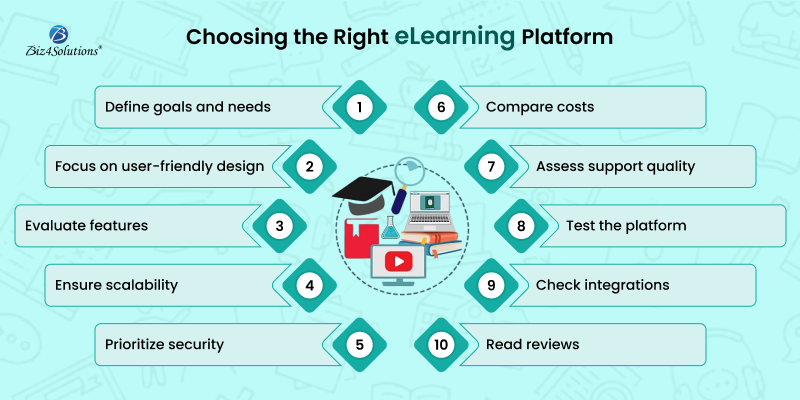
1. Understand Your Goals and Needs
Start by identifying your institution’s goals and needs. Are you looking for a platform to support blended learning, fully online courses, or both? Consider the following:
  • The size of your institution
  • The age group and learning levels of your students.
  • The subjects or courses to be offered.
  • The need for scalability and customization.
  • Having a clear understanding of these requirements will help narrow down the options.
2. Evaluate User-Friendliness
An eLearning platform must be intuitive and easy to navigate for both instructors and students. Test the platform’s interface to ensure:
  • Instructors can quickly create and manage courses.
  • Learners can access study materials effortlessly and also track their progress.
  • Minimal training is needed to get started.
A complicated platform can lead to frustration and low adoption rates.
3. Assess Features and Functionality
Different platforms offer varying features. When developing the eLearning app, look for ones that align with your teaching methods and institutional goals. Key features to consider include:
  • Content creation and management tools.
  • Multimedia support (videos, quizzes, and interactive elements).
  • Communication tools (forums, chats, and video conferencing).
  • Assessment and reporting tools.
  • Integration with third-party apps like Google Classroom or Microsoft Teams.
4. Ensure Scalability and Flexibility
Develop software that can grow with your institution. Scalability is essential if you plan to expand your student base or add new courses. Additionally, ensure the eLearning solution is flexible enough to adapt to evolving educational needs, emerging technologies, and demanding end-user preferences.
5. Prioritize Security and Privacy
With the increasing prevalence of cyber threats, a secure web or mobile solution is non-negotiable. Verify that the platform complies with data protection regulations, such as GDPR or FERPA, and offers:
  • Secure data storage and transmission.
  • Role-based access controls.
  • Regular updates and maintenance.
6. Review Cost and Licensing
Financial limitations frequently influence decision-making processes. So, compare pricing models, including subscription-based plans, one-time fees, and freemium models. Also, take into consideration, the total ownership expenses including the following:
  • Licensing fees.
  • Implementation costs.
  • Training and support expenses.
7. Check Customer Support and Training
Dependable customer support plays a crucial role. Consider platforms that provide:
  • 24/7 support.
  • Comprehensive documentation and training resources.
  • Community forums or user groups to provide additional assistance.
8. Test the Platform
Before finalizing your decision, ask for a demo or trial period. This firsthand experience enables you to:
  • Experience the user interface.
  • Assess performance and reliability.
  • Gather feedback from instructors and students.
9. Consider Integration and Compatibility
Ensure the platform integrates seamlessly with your existing systems, such as student information systems (SIS) and learning management systems (LMS). Compatibility with various devices and operating systems is also essential to provide a smooth learning experience.
10. Read Reviews and Get Recommendations
Research online reviews and ask for recommendations from other institutions. Hearing about real-world experiences can provide valuable insights into the platform’s strengths and weaknesses.

Final Verdict

Selecting the right eLearning app development strategy is a crucial decision that impacts the quality of education at your institution. By carefully evaluating your goals, budget, and the platform’s features, you can make an informed choice. Remember, the ideal software application or website should not only meet your current needs but also support your organization’s growth and future requirements. Take your time, involve stakeholders, pair up with seasoned software development professionals, and choose wisely for a successful eLearning journey.
How will AI Power the Next Generation of Healthcare Wearables?

Wearables have become one of the most sought-after tools for proactive healthcare and wellness management. Be it tracking heart rate, ECG, blood oxygen levels, and fall detection using the Apple Watch; monitoring blood glucose levels with Dexcom G6; gaining crucial insights into one’s sleep quality, heart rate, and body temperature with the Oura Ring; or using the iRhythm Zio Patch for extended ECG monitoring to diagnose heart conditions; wearables have become an integral part of our healthcare and wellness objectives.
Nevertheless, the future of these devices is even more promising, thanks to the integration of Artificial Intelligence in wearable app development. But how exactly will AI power the next generation of healthcare wearables? What should be the approach of healthcare and wellness providers? Let’s explore!

The Convergence of Wearables and AI

Artificial Intelligence has already made significant strides in healthcare, from diagnosing diseases with greater accuracy to predicting health trends. Wearable devices, which have traditionally focused on tracking physical metrics, are now set to evolve by incorporating AI algorithms. This convergence of AI and wearables will enable devices to do far more than simply collect data; they will offer actionable insights, personalized health recommendations, and even early warnings about potential health issues.
Key Drivers of Convergence
  • Miniaturization of Hardware: The development of compact sensors and processors enables wearables to host AI capabilities without compromising comfort.
  • Data Proliferation: Wearables generate vast amounts of biometric and activity data, fueling AI algorithms to deliver accurate insights.
  • Cloud and Edge Computing: These technologies empower wearables with the ability to process data locally (edge) or leverage extensive computational resources (cloud).
Emerging Trends
  • Devices like AI-integrated patches and smart glasses are becoming diagnostic tools, bridging the gap between home care and clinical settings.
  • AI dynamically adjusts wearable interfaces, enhancing accessibility and usability for diverse users.
  • AI wearables integrate seamlessly with smart home and IoT devices, creating a unified personal technology environment

Use Cases of AI-powered Wearables

 
ai app development
Healthcare Monitoring
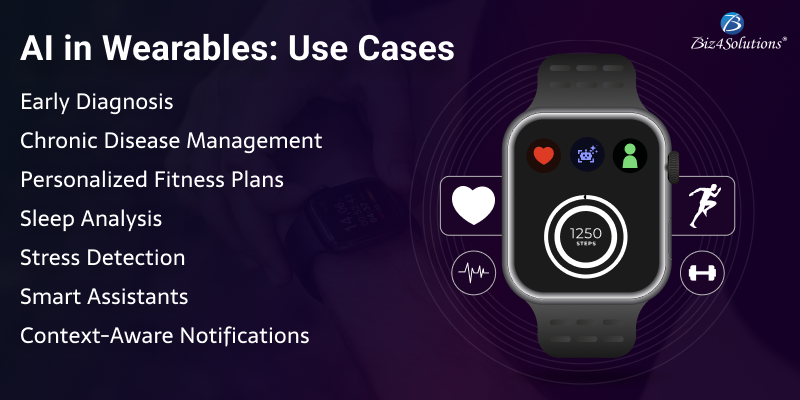
  • Early Diagnosis: AI-powered wearables monitor vital signs like heart rate, blood oxygen levels, and glucose levels, identifying anomalies indicative of conditions like arrhythmias or diabetes.
  • Chronic Disease Management: Continuous monitoring and AI analysis help patients manage chronic illnesses effectively, providing actionable feedback to users and healthcare providers.
Fitness and Lifestyle
  • Personalized Fitness Plans: AI in wearables interprets activity levels and fitness goals to design tailored workout regimens.
  • Sleep Analysis: Smart wearables analyze sleep patterns, suggesting interventions to improve rest quality.
Mental Health Support
  • AI-enabled wearables detect stress through biometric markers like heart rate variability and galvanic skin response. They offer real-time interventions, such as guided breathing or meditation exercises.
Enhanced Productivity
  • Smart Assistants: Voice-controlled AI assistants in wearables streamline task management and reminders.
  • Context-Aware Notifications: AI filters and prioritizes alerts based on user context to reduce distractions.

How to code an AI-powered Wearable?

 
ai app development
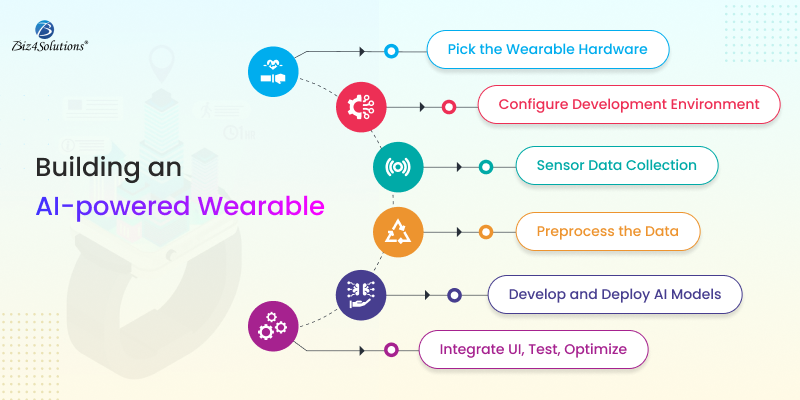
1. Choose Your Wearable Hardware
Select a suitable platform for your wearable, such as:
  • Smartwatches (Fitbit Smartwatch, Apple Watch, Google Pixel Watch, etc.)
  • Fitness trackers (Fitbit, Garmin)
  • Custom hardware (using platforms like Arduino or Raspberry Pi with sensors)
Ensure your device has sensors like accelerometers, gyroscopes, heart rate monitors, or GPS, depending on the functionality you want.
2. Set Up Development Environment
  • Smartwatch/Phone Apps: Use SDKs for specific platforms like Apple’s WatchKit, Google Fit, or other wearable APIs.
  • Custom Hardware: Use Arduino IDE, Raspberry Pi with Python, or ESP32 for Bluetooth connectivity.
3. Sensor Data Collection
Wearables collect various data types, such as:
  • Accelerometer data (motion, step count)
  • Heart rate (using sensors like PPG)
  • Temperature or humidity (depending on the wearable)
  • GPS data (for location tracking)
Use appropriate libraries or APIs to fetch sensor data. For example:
  • Apple Watch: Use HealthKit to retrieve health-related data.
  • Fitbit: Use Fitbit API for activity data.
  • Custom Hardware: Use libraries specific to sensors (e.g., Adafruit libraries for accelerometers or temperature sensors).
4. Preprocessing the Data
Before sending the data to your AI model, you’ll often need to preprocess it:
  • Noise removal: Use filters to remove noise from sensor data.
  • Normalization: Normalize the sensor data for better model performance.
  • Feature extraction: Extract meaningful features (e.g., step count, movement patterns, heart rate variability).
5. Develop or Integrate AI Models
AI models can enhance the wearable’s functionality. Examples include:
  • Activity recognition: Detect types of activities (walking, running, etc.) using sensor data.
  • Health prediction: Predict heart health, stress levels, or sleep patterns.
  • Personalized feedback: Provide suggestions for exercise, rest, etc.
You can develop machine learning models in:
  • Python: Using frameworks like TensorFlow, Keras, or PyTorch.
  • Edge AI frameworks: For running models directly on the wearable (e.g., TensorFlow Lite for mobile/embedded devices).
You might need to train the models on large datasets (e.g., sensor data labeled with activities or health metrics). Once the model is trained, convert it into a format suitable for deployment on the wearable device.
6. Deploying the AI Model
  • On-device AI: For real-time AI processing, you can deploy the model directly onto the wearable’s hardware (using TensorFlow Lite, CoreML for Apple devices, etc.).
  • Cloud AI: Alternatively, send data to the cloud (via Bluetooth or Wi-Fi) for processing. This requires setting up APIs for data transmission and creating cloud-based AI models.
  • Smartwatch Apps: Use UI frameworks like SwiftUI (for iOS) or Jetpack Compose (for Android) to display AI insights.
  • Feedback and Interaction: Depending on the application, give the user real-time feedback (e.g., “You’re walking briskly, keep going!”) or notifications for specific health metrics (e.g., “Your heart rate is high, take a break”).
8. Testing and Optimization
  • Test your wearable AI application under real-life conditions to ensure it responds well to various user behaviors and sensor inputs.
  • Optimize power consumption, especially for battery-powered wearables.
  • Ensure that AI computations do not overburden the device’s processor or memory.
9. Security and Privacy
  • Wearable devices handle sensitive personal data (health data, location, etc.), so it’s critical to ensure strong encryption for data storage and transmission.
  • Implement secure authentication methods, like two-factor authentication for cloud-based services.
  • Comply with privacy regulations like GDPR or HIPAA.
10. Continuous Improvement
  • Continuously gather more data and retrain your models to improve accuracy.
  • Collect user feedback to refine the AI’s predictive abilities and response.
By combining hardware with AI models, you can create a powerful wearable device that offers personalized, intelligent experiences to users.
Example Code Snippet (Activity Recognition with Python)
For custom hardware (e.g., Arduino with accelerometer):
import numpy as np
from sklearn.svm import SVC
# Collect and preprocess sensor data (e.g., accelerometer)
X_train = np.array([…]) # training data (sensor values)
y_train = np.array([…]) # corresponding activity labels
# Train a simple classifier
clf = SVC(kernel=’linear’)
clf.fit(X_train, y_train)
# Once trained, predict activity based on new sensor data
X_test = np.array([…]) # new data
activity = clf.predict(X_test)
print(f”Predicted activity: {activity}”)

Challenges and Considerations

  • Data Privacy: The sensitive nature of health and biometric data requires stringent security measures and transparent policies.
  • Battery Life: Advanced AI processing demands significant power, pushing the need for innovations in battery technology.
  • Accuracy and Bias: AI models must be rigorously tested to ensure unbiased and precise outputs, particularly in healthcare applications.

Future Outlook

The next generation of healthcare wearables powered by AI is no longer a distant vision; it’s on the horizon—and it’s going to change the way we approach healthcare app development forever. The convergence of AI and wearables is poised to redefine how humans interact with technology, transforming them into indispensable tools for health, productivity, and well-being. As technology advances, the integration of wearables with AI will likely expand into augmented reality (AR), virtual reality (VR), and neural interfaces, unlocking unprecedented possibilities.